Picashow APK

Picashow Apk is a simple app for entertainment. You watch movies, shows, sports, and live TV with it. It shows all videos in one place. You also choose the video quality.
(Free Download)
Introduction
You match the quality with your internet speed. You move through different sections and you find programs easily. The app does not come from the Play Store. It comes as an APK file. You install it on Android phones and tablets. You also use an emulator and you run it on Windows. It is a good choice for people who love movies because it has many movies and simple controls.
What Is PicaShow APK?
Picashow Apk is a third-party app for Android phones and tablets. It gives you a big library of movies, TV shows, and live channels. You move through the sections easily. You do not need many apps. The app has a simple design and a search system. You type a movie or show name in the search bar and you find it. You also download videos and you watch them offline. This helps you when you have no internet. Overall, the app makes streaming easy and you do not worry about monthly payments.
What Does PicaShow Have to Offer?
Free Streaming
Find all types of movies, serials, and live shows on the app. You pay no fee. You open a category and you select content from the home screen. This free viewing helps you find all entertainment in one place. You still need internet for online play. Your data use depends on the quality and watch time. PikaShow does not ask you to buy any plan.
HD Playback Support
Good quality helps you see details in movies, sports, and TV shows. You need a good phone for HD play. Pictures look clear on a tablet, TV, or computer screen. Video quality depends on your internet speed. You stream in higher quality when you have fast internet.
Adjustable Video Quality
The app gives you many quality options. Choose quality and data use. You choose low quality and the video loads fast on a slow network. You choose high quality and you get a clear picture when your connection is strong. PicaShow keeps these controls near the video player. You switch quality during playback if your network becomes weak. This reduces pauses and you do not need to close the program.
Offline Viewing
You save videos on your device and you watch them later. This helps you when you travel, when power goes out, or when mobile data is low. You create a watch list before you lose connection. So downloads do not buffer even if the network is weak. You just manage your storage. You delete watched videos for better storage.
Multiple Language Options
The library has programs for regional viewers. You use language options and you find films and shows you understand. Some videos have audio options, and some have audio in native languages. Regional sections also help you find entertainment for your area. PikaShow puts all these options in one system. The language choice changes with the title, channel, or source, so you check the options before you play.
Subtitle Support
Subtitles help you when you do not understand the language or when you keep the volume low. Some videos show text at the bottom of the player. You select a subtitle track and you watch more comfortably. Subtitle options change with the title. The exact words may differ from source to source. Subtitles are good for foreign films, web series, and quiet watching. They make names, accents, and fast speech easy to understand.
Additional Features of PicaShow Watch
No Account Required
You do not need an account for streaming on PicaShow. Open the main app without any long registration form. You also do not pay any subscription fee. The app gives you all content for free. You do not need to remember account details. You just open the app and you start streaming.
Built In Video Player
The app has its own player for films, shows, and live channels. You do not need to install another player. Simple buttons control play, pause, forward, audio, and screen size. Controls may change with the video source. The built-in design makes viewing easy inside the app and it reduces extra steps. It also helps new users learn playback quickly without moving from one screen to another or to outside players.
Chromecast Support
Casting support lets you send content from your mobile to your TV screen. Both devices need the same network and compatible casting setup. This feature helps you watch movies, family shows, or sports on TV with many people. You still use your phone as a controller. PikaShow shows content on a big screen and keeps the mobile experience, depending on your device and network.
Search and Navigation Tools
You enter the name of a film, series, or program and you find it. People who do not know what to watch also find ideas through categories. Also, menus link content areas and reduce boring jumps from screen to screen. Search results work best when you type the correct title or spelling. With these tools, you manage a big library easily.
Organized Content Categories
The app shows separate areas for movies, shows, sports, news, music, and live channels. This helps you because entertainment does not stay on one long page. You enter a section you like. PikaShow Online also uses category labels and you find things fast if you do not select a title.
Custom Playback Controls
Playback controls give you more flexibility. You stop a scene, scroll the timeline, play with sound, or switch screen view. Some sources also give speed, language, or subtitle options. Not all controls show in all streams. But it keeps common options easy and quick to reach.
Android and Emulator Support
The APK works for Android phones and tablets. You also open the Android file on Windows with an emulator like BlueStacks or NoxPlayer. An emulator gives you display and computer controls. So PikaShow does not need a separate Windows program, but performance changes with your computer and emulator setup.
Regular App Updates
New versions help you update the layout, fix errors, and improve video source switching. Changes may also modify menus or playback if some old features do not work anymore. When your current version becomes old, you need to update to the new APK version from your trusted source.
User Interface of PicaShow APK
Clear Content Thumbnails
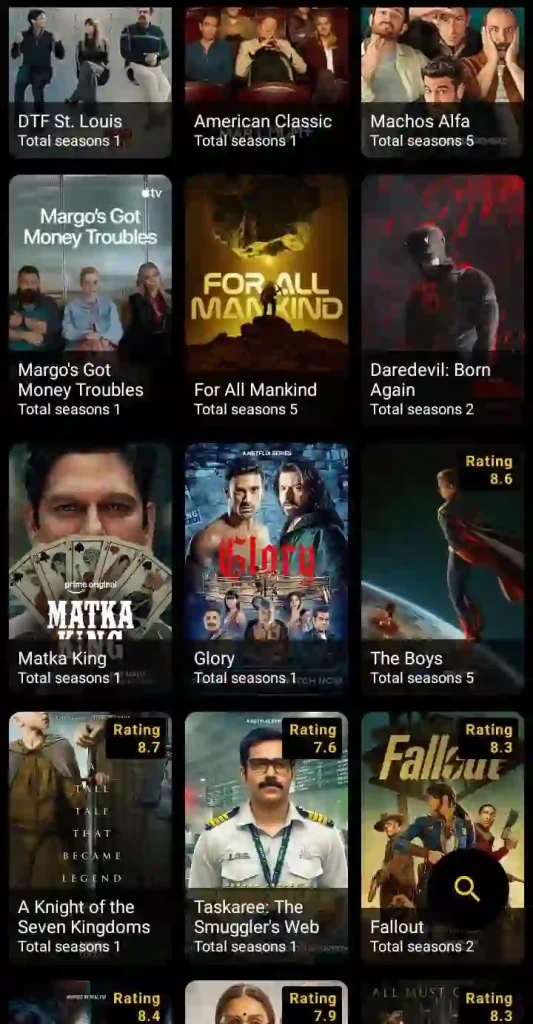
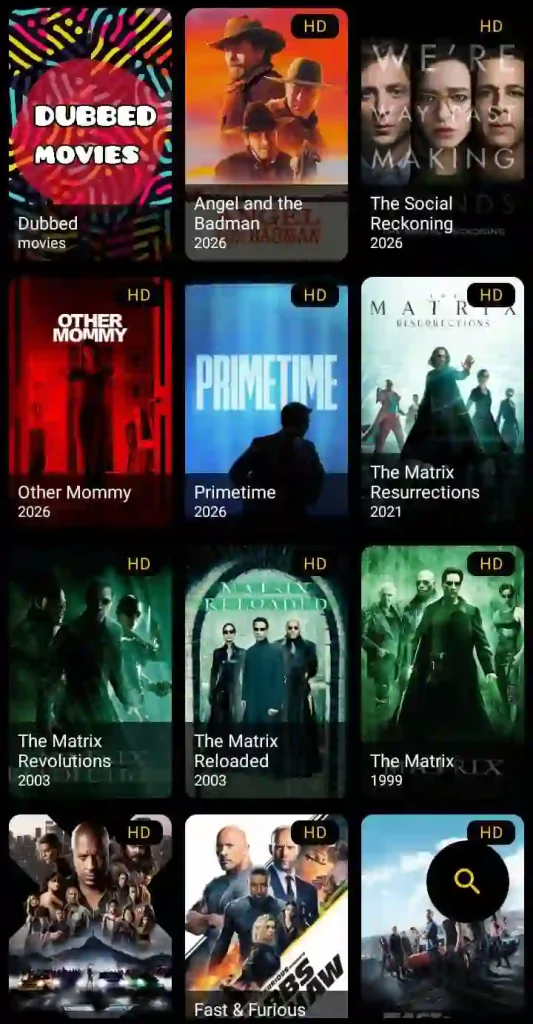
Visual thumbnails give you an idea about films, shows, and programs before you open them. Posters give space for each piece of content in crowded rows. Also, short titles sit under the images and help you identify choices.
Simple Navigation Menu
A simple menu links the home area to main content areas. You switch from movies to shows, sports, or live channels with a few taps. Also, familiar icons help you understand common actions better. The menu still works on small screens because it limits extra choices and it groups main viewing directions together for easy access.
Quick Search Bar
Viewers find known titles with a search bar. You input a movie, a show, an actor, or a term and you view matching results. PicaShow keeps this tool near the browsing area. You start typing a name and the app suggests available titles with those letters.
Live TV Channel Categories on PicaShow
Entertainment Channels
Entertainment channels show serials, reality shows, interviews, and TV shows in one place. Viewers choose from around the world. Also, live schedules help people follow programs when they run. So this group is better for people who like many TV shows and not one genre.
Sports Channels
The sports section includes live matches, event programs, scores, and other sports coverage. Common interests include cricket and football, but other events include tennis or wrestling. PikaShow groups these streams for quick access during games. Availability of channels and events may change. Live action plays with less pausing when you have a stable connection.
News Channels
News channels show reports, interviews, weather news, business news, and event coverage. You view local and foreign broadcasts from the same category. At the same time, live feeds help viewers follow stories. The section may change as channels are added and schedules change.
Music Channels
Songs, video programs, concerts, charts, and artist features are all examples of music channels. Music choices include regional, film songs, pop, and more. Also, live programs give listeners another way to find new artists. PikaShow separates music from movies and TV drama, so you go to the section you want more easily.
Kids Channels
This section combines cartoons, animated films, songs, and learning programs. Meanwhile, parents find age-appropriate entertainment easily with clear category labels. But before viewing, responsible adults need to check programs carefully. PikaShow is family-friendly and focuses on kid-friendly choices in this category.
Content Collection on PicaShow
Movies
The app has a movie area with various languages, regions, and genres. You find options for action, comedy, family, romance, drama, horror, or thriller. Posters and category labels help make the library easy to scan. Also, quality controls help you match playback with your connection. Films stay in one major section, and Picashow Apk Movie availability may change as sources and listings update.
TV Shows
Television fans enjoy serials, reality, drama, and entertainment shows. This section includes existing and finished programs in a familiar browsing structure. When it takes longer to check content rows, you search by title. But episode order and availability may vary by program.
Web Series
Web series are episodic, season-based shows that stream online. This includes drama, comedy, crime, romance, or action from around the world. PikaShow keeps them separate from television channels. Search and category tools help you find a series or find something similar. But language, subtitles, and picture quality depend on the program and streaming source.
PicaShow APK Download and Installation Steps
Is PicaShow TV Available for iOS?
No PicaShow Apk exists in the Apple App Store. You cannot install the Android APK on iOS because iOS uses a different package format. Some platforms claim they have an iOS file but you cannot install it as a regular app. People on iOS can use known streaming apps made for Apple devices. These official apps need installation from app stores and often need a subscription. A few alternatives to PikaShow for iOS exist like Netmirror that you use with Safari in the browser version. But you should not trust unknown profiles or certificates that ask for access to many devices. APK files work only on Android Phones.
Download PicaShow for Windows
- You open a browser and you visit the BlueStacks or NoxPlayer website on your Windows computer.
- You download the installer that matches your Windows version and computer type.
- You open the file and you complete the emulator setup by following directions.
- You download the current Picashow Apk from your chosen source.
- You open the emulator and you select its APK installation tool from the menu.
- You choose the downloaded file from your computer.
- You wait while the emulator installs the Android package.
- You open the app through the emulator home screen.
- You adjust sound, display, and performance settings if needed.
- You use a stable connection for smoother playback on the larger screen.
Top Alternatives to PikaShow
Netflix
Netflix is an official app and you access it across many platforms. You pay subscription charges to access the content library. But library content changes from region to region. For people who want a legal option with original content, PikaShow users may try Netflix, but it needs a paid plan.
YouTube
Creators, media companies, educators, musicians, and live broadcasters all have videos on YouTube. Most material is free with ads, and paid plans give extra features. You use YouTube Premium if you want to remove ads. However, PikaShow’s content collection is not available on YouTube.
Disney Plus
Disney Plus is a subscription-based service. It offers movies and shows from Disney and its supported brands. The library has family stories, animation, franchise titles, documentaries, and original series. But the content library is limited even though it is a paid app. PikaShow gives access to content from all streaming platforms at one place for free.
App Screenshots

Pros
Cons
User Reviews
Review 1
I appreciate how PikaShow organizes films, television shows, and sports into distinct, clear parts. The search bar also saves my time if I remember the title. Moreover, quality settings let me reduce my data usage when I am on a mobile network.
Review 2
I mainly view PikaShow content with an Android phone and I sometimes download PikaShow content when I have to travel. It also helps me view offline, as the connection can become weak. Installation is tricky because it does not come from an app store. Some streams may load slowly, but lowering video quality many times makes the program play with less buffering on my device.